 Hello World
 Time to read: 3 min read
Graphing with Chart.js
Data visualization is the graphic representation of data and information.
Visualizing data is a powerful tool, translating data information into meaningful insights. The aim of data visualization is to spot patterns and trends in data sets, allowing us to gain a better understanding of the information. Before turning the data into its graphical representation, data cleaning is an essential stage prior to the actual data processing. In order to ensure working with clean data sets, undesire data inputs such as incomplete, inaccurate and irrelevant records have to be removed or replaced. Once the data is cleaned, it is ready to be translated to visual interpretation.
In the tutorial, we used an already cleaned data set from NASA. The only 'cleaning' required was to remove the last line of empty input which gives undefined. And Voilà, here is the final result! 🎉 NASA Mean Temperature Data
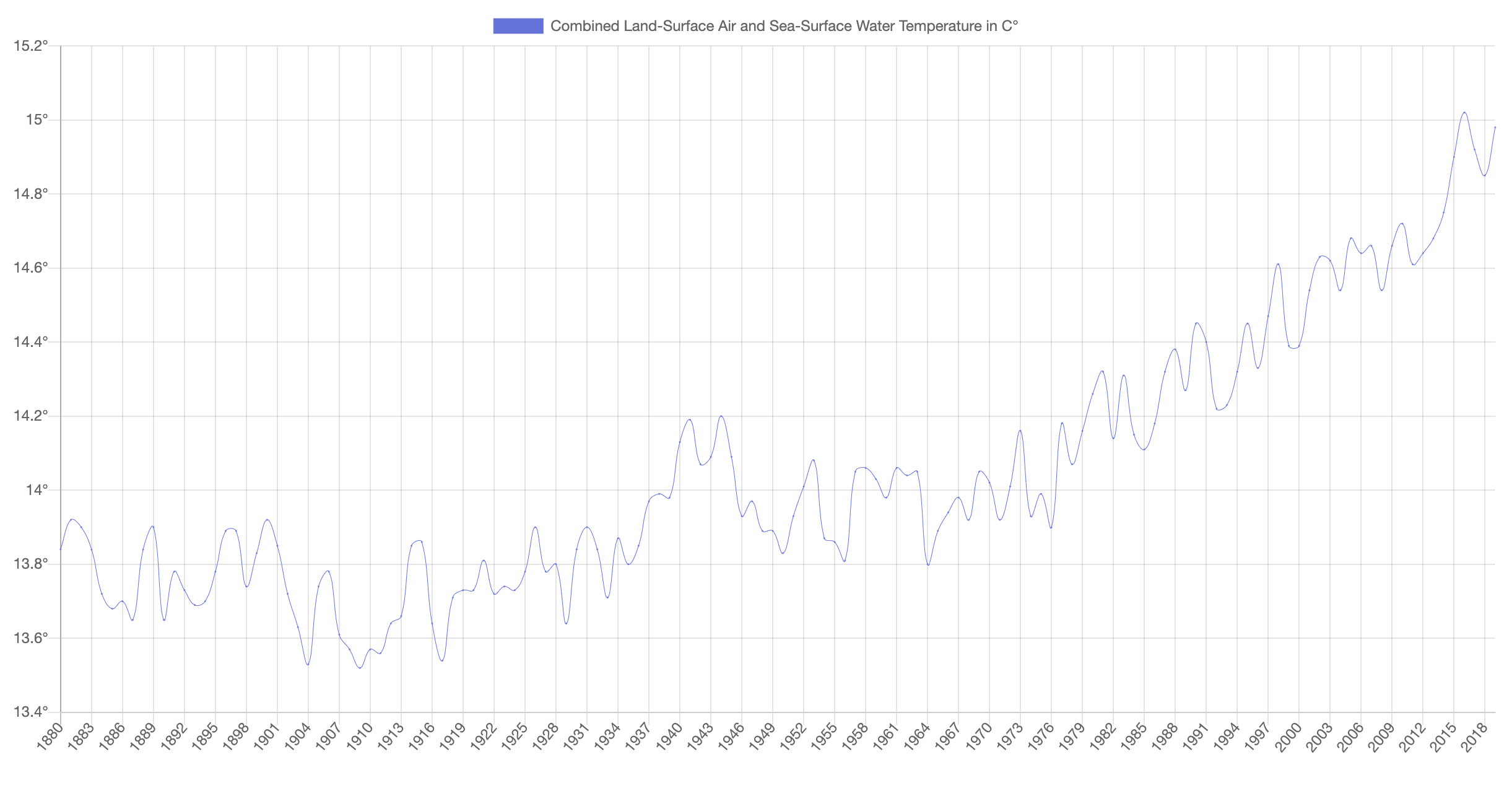
One thing for sure about creating new things is to master the art of reading documentations and applying them to the development itself. Immense amount of patience is needed but it's worth it.
Fetch API
Fetch API provides a Javascript interface for accessing and manipulating parts of the HTTP pipeline, such as
RequestsandResponses.
The fetch() method is a simple way to fetch resources asynchronously across the network.Fetch() returns a Promise which resolves the Response to the request. Next, different methods will be applied to the retrieved Response to identify the body content and how it should be handled. The body content can be in the format of text, blob (image) or JSON (javascript objects notation).
Async Function
Async functions can contain zero or more await expressions. Await expressions suspend progress through an async function, yielding control and subsequently resuming progress only when an awaited promise-based asynchronous operation is either fulfilled or rejected.
await keyword is only valid inside async function. The goal of async/await is to simplify the combination of generators and promises. Async functions always return a promise, explicitly or implicitly wrapped in a promise.
A basic code demo of fetching in async function:
async function getURL() {
    const response = await fetch('url');
    const data = await response.text(); // if in text format
                 await response.blob(); // if in image format
                 await response.json(); // if in JSON format
    console.log(data);
}
As a follow up exercise, I tried it on Covid-19 Dataset. Total Covid-19 cases Data